How to fill out the Internship Project Registration FO-EST-03-002
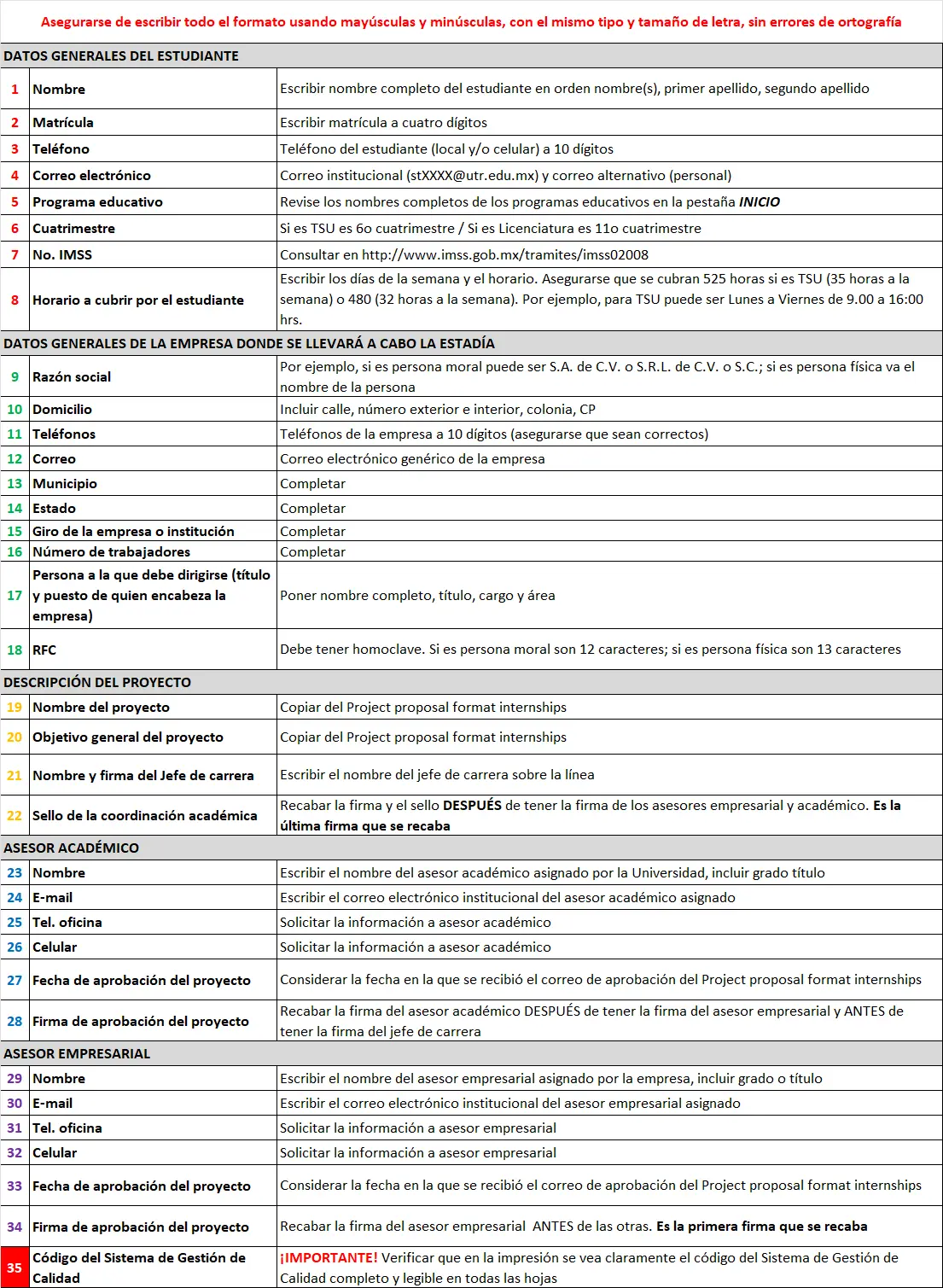
Make sure the entire form is completed using uppercase and lowercase correctly, with the same font type and size, and without spelling mistakes.
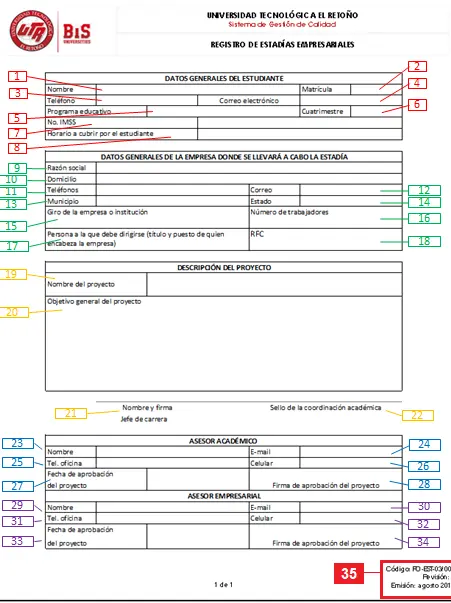
- Name: Write the student's full name in the following order: given name(s), first last name, second last name.
- Student ID: Write the four-digit student ID number.
- Phone: Student phone number (home and/or mobile) with 10 digits.
- Email: Institutional email (stXXXX@utr.edu.mx) and alternate (personal) email.
- Academic program: Check the full names of the academic programs in the HOME tab.
- Term: If it is TSU, it is the 6th term / If it is Bachelor's degree, it is the 11th term.
- IMSS No.: Check at http://www.imss.gob.mx/tramites/imss02008
- Schedule to be covered by the student: Write the days of the week and the schedule. Make sure 525 hours are covered if it is TSU (35 hours per week) or 480 hours (32 hours per week). For example, for TSU it may be Monday to Friday from 9:00 to 16:00.
- Corporate name: For example, if it is a legal entity it may be S.A. de C.V., S.R.L. de C.V., or S.C.; if it is a natural person, enter the person's name.
- Address: Include street, exterior and interior number, neighborhood, postal code.
- Phone numbers: Company phone numbers with 10 digits (make sure they are correct).
- Email: Generic company email.
- Municipality: Complete.
- State: Complete.
- Line of business of the company or institution: Complete.
- Number of employees: Complete.
- Person to whom it should be addressed (title and position of the person heading the company): Enter full name, title, position, and area.
- RFC: It must include the homoclave. If it is a legal entity, it has 12 characters; if it is a natural person, it has 13 characters.
- Project name: Copy it from the Project proposal format internships.
- General objective of the project: Copy it from the Project proposal format internships.
- Name and signature of the Head of Program: Write the name of the Head of Program above the line.
- Academic coordination stamp: Obtain the signature and stamp AFTER having the signatures of the company advisor and academic advisor. It is the last signature to be collected.
- Name (academic advisor): Write the name of the academic advisor assigned by the University, including degree or title.
- E-mail (academic advisor): Write the institutional email of the academic advisor assigned.
- Office phone (academic advisor): Request the information from the academic advisor.
- Mobile phone (academic advisor): Request the information from the academic advisor.
- Project approval date (academic advisor): Consider the date when the project approval email for the Project proposal format internships was received.
- Project approval signature (academic advisor): Obtain the academic advisor's signature AFTER getting the company advisor's signature and BEFORE getting the Head of Program's signature.
- Name (company advisor): Write the name of the company advisor assigned by the company, including degree or title.
- E-mail (company advisor): Write the institutional email of the company advisor assigned.
- Office phone (company advisor): Request the information from the company advisor.
- Mobile phone (company advisor): Request the information from the company advisor.
- Project approval date (company advisor): Consider the date when the project approval email for the Project proposal format internships was received.
- Project approval signature (company advisor): Obtain the company advisor's signature BEFORE the others. It is the first signature to be collected.
- Quality Management System code: IMPORTANT: Verify that the complete Quality Management System code appears clearly and legibly on all pages when printed.
IMPORTANT!
The file name of the Internship Project Registration must be:
`ID_FIRST-LAST-NAME_SECOND-LAST-NAME_GIVEN-NAMES_PROJECT_REGISTRATION.PDF`
For example:
`2814_GOMEZ_HERNANDEZ_MARTA_GRACIELA_PROJECT_REGISTRATION.PDF`
- The full file name must be in UPPERCASE.
- No accents or spaces (use underscore `_` instead of spaces).
- Do not use Ñ; replace it with N. For example, `MUNOZ` instead of `MUÑOZ`.
Reference images